Showing posts with label computers. Show all posts

Monday, 1 May 2017

Ripjaws KM780 Keyboard


With its Ripjaws KM780, G.Skill went all out on the bells and whistles, including creating a funky overall chassis design and loading the thing up with additional keys.
As far as putting a dent in the keyboard market, the KM780 shows G.Skill’s willingness to try something risky even as it flexes its muscles as a budding peripherals maker.

The question we need to answer here is whether G.Skill can create a top-notch keyboard.


G.Skill has several iterations of the KM780 available, and it’s important to parse them out here. The unit we reviewed is the highest-end possible: the KM780 with RGB switches and the extra keys. We looked at the model with Cherry MX RGB Brown switches, but you can also get a unit with Cherry MX RGB Blues or Reds. 
A step-down, you can roll with the single-color (red only) KM780 with standard Cherry MX Red, Brown, or Blue switches. 


There’s also a whole series of KM780R keyboards, which is the same as the above but without the extra key caps. Three of the KM780R models have RGB switches ($160), and three have standard Cherry MX switches and single-color LEDs (red).
Oddly, all of the single-color LED models mentioned above have silver-colored roll bars and dedicated buttons instead of black.
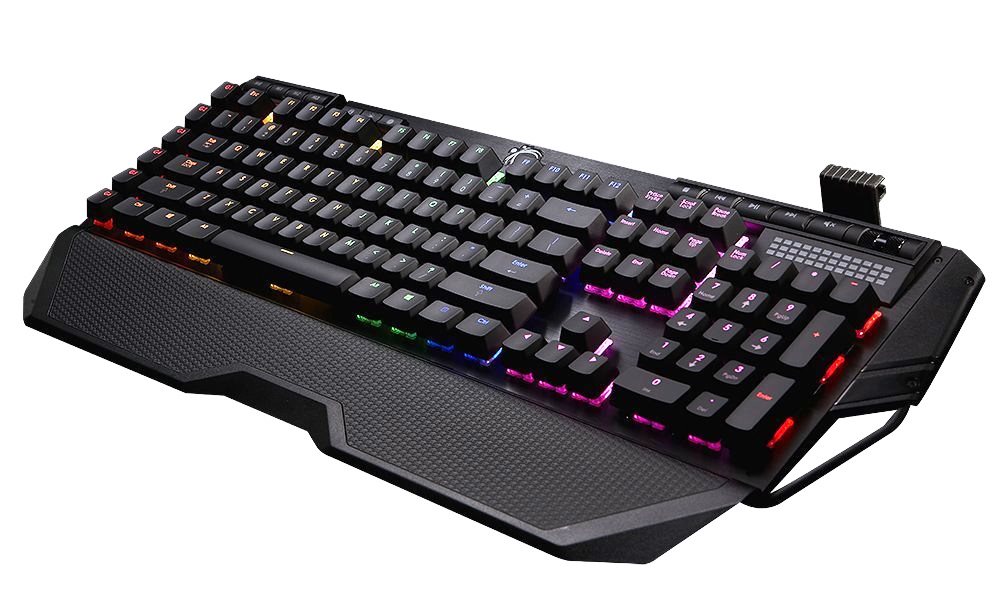


With the KM780, G.Skill really went for it on the design. In addition to being loaded with extra keys and dedicated media & lighting buttons, it’s rimmed with a rolled metal bar that juts out rather far on the left and rights sides of the keyboard. There’s also a large, removable wrist rest with a slightly rubberized finish, and when the keyboard is fully dressed, it’s rather wide and large.


Unless you have ample desk space, you may find that the KM780 crowds your mouse and possibly other items. Some will certainly find this huge keyboard to be garish and over the top, but I imagine that others will love it. After all, the rolled bar is not merely decorative; the wrist rest attaches to it, as does the box containing the extra key caps (more on that shortly), and there’s a mouse cable bungee that’s attached to the bar as well.
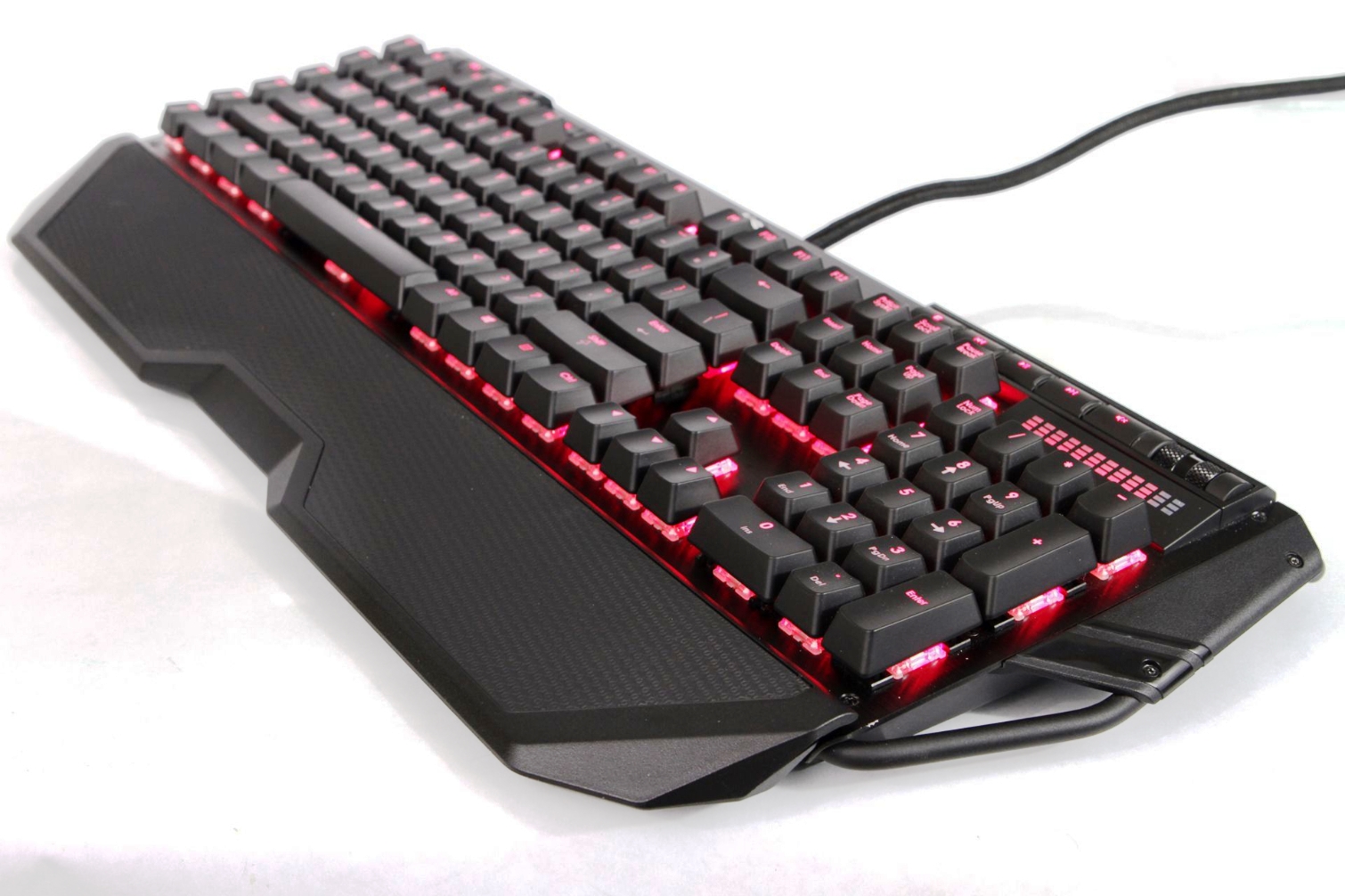


In fact, because of the bar, you can slide the bungee all across the top edge of the keyboard for optimal placement. There is no additional cable routing underneath the KM780, but with the bungee, you won’t miss it.
There are two small feet under the KM780 that flip up to provide a steeper typing angle. They’re hard plastic, with no rubber tips. If you have a particularly slippery desk surface, this may cause an issue. Without the feet up, though, there are four rubber pads under the keyboard (and two under the wrist rest) that should provide a solid no-slip grip.


The switches are mounted onto a sharp-looking black, anodized brushed aluminum top plate, a la Corsair. In addition to the standard 104 keys you’d expect, G.Skill added a vertical row of six G keys on the left side (adding to the aforementioned width of the KM780). If you have reasonably large hands, you should be able to hit some of them with your pinky while gaming easily. However, you’ll have to lift your hand from the WASD keys to to reach the ones at the top and bottom of the column.


On the upper left, there are four dedicated macro buttons, and next to that are three more buttons: a Windows lock key, four-stage LED backlight brightness toggle button, and a timer key. (Yes, a timer key. More on that in the Software section.) On the upper right side are several media buttons (stop, play, forward, back, mute), including a diecast metal volume roller. All of those keys and buttons are LED-backlit. Below them is a large light bar that helpfully indicates volume level.


G.Skill included one USB passthrough port, but it also included two audio passthrough for your headset/mic. Next to that is a little switch labelled “G” on one side and “S” on the other. When switched to G, the keyboard will be in NKRO mode; when switched to S, it will be on 6KRO (you may want to adjust this depending on what your PC supports).


You may also be interested in Hands On Logitech G413 Mechanical Keyboard


Tuesday, 24 January 2017

Here is a Free Amazing software to manage network profiles.


NetSetMan is the perfect complement for those who usually require changing their network settings because they connect to different networks, probably on different locations. The program allows you to save six different network configurations, and you can change from one to another with just a couple of clicks, without even requiring to restart your system. Thanks to NetSetMan, you can now forget about memorizing and manually changing all those intricate network settings, as you can get it done automatically in no time.


The program's main window offers you six tabs, one for each possible network profile. By double-clicking on a tab you can set a significative name for its corresponding configuration. In addition, creating a new network profile is as easy as right-clicking on a tab and selecting the "Get Current Settings" command. This action will copy your currently running network configuration to the selected profile and, from now on, you can return to it by simply selecting it again and clicking on the "Activate" button. However, there is an even easier way to switch to an alternative network profile: through the program's tray menu. NetSetMan installs an icon on your system notification area and it displays a menu with your six possible network profiles. With just one click, you can switch to any of them.


If you happen to be an advanced user, you can alternatively create a network profile from the scratch by manually specifying all the required parameters such as the IP address, subnet mask, default gateway, preferred and alternate DNS servers, Printer, Workgroup and many more. You can also click on the "IP+" button to access the "Advanced TCP/IP Settings Window" where you can configure additional IP addresses for your network adapters, additional gateways and even create your own routing table. On the other hand, NetSetMan also allows you to manage sub-profiles which refer to different setting for different network adapters, within the same main profile.


To sum it all up, NetSetMan is a powerful yet practical tool that allows you to change your network settings in a way that couldn't be easier. Once you have configured all your required network profiles, you can switch to the compact mode of the program which also allows you to change your profile with one click. The program can be used totally free of charge as long as you don't use it for commercial purposes.


Download Here

Friday, 30 December 2016

Samsung Set To Unveil New Quantum Dot Curved Monitors For Gamers At CES 2017


Curved TVs may at present hold somewhat of a polarizing quality for a few, given slight grasps with the innovation, however a bended screen, where an individual could see it at a much nearer separation, is another discussion through and through. 

With bended screens, light sources can be more controlled since individuals sit nearer toward it, disposing of annoying reflections regularly altruistically give bended TVs. Samsung knows this well, so it's discharging another bended screen utilizing quantum dab innovation, intended to offer a forefront and immersive survey understanding. 


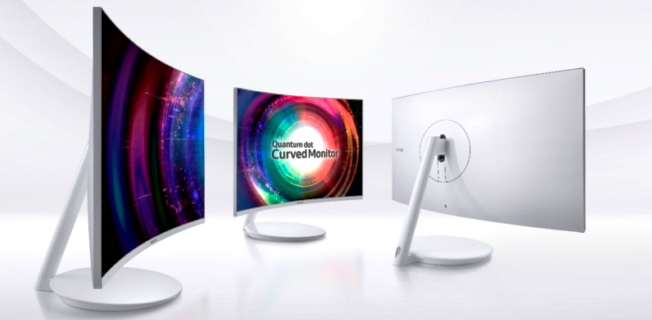
Samsung CH711 Quantum Dot Curved Monitor The curved screen conveys the name CH711, and is slated for a CES disclosing this January. CES is the battlefront for tech organizations duking it out as far as development, swagger or even plain eyecandy, and Samsung, similar to some other organization, needs to emerge from the group in the event that it needs to get liberal footing. To do this current, it's showcasing a lineup of bended screens, the CH711 incorporated, that is "designed bearing  gamers in mind."


The CH711 comes in 27-or 31.5-inch variations, including a 1,800R ebb and flow – 1,800 mm arch span over the screen's width. The two models will accompany a determination of 2,560 by 1,440 with support for 125 percent sRGB shading scope.


What Are Quantum Dots? 

Quantum dat technology is a five-dollar state for more energetic and power-effective displays, in spite of the fact that that is a distortion. For clarity's purpose, quantum spots are fundamentally semiconductor nanocrystals cooperating to render a brighter show and duplicate exact hues. All previously mentioned qualities may sound alluring, however its assembling procedure can be extremely troublesome. Industry achievements, in any case, have made it more doable to make, and with Samsung being the quintessential hardware organization that it will be, it's reasonable that the CH711 won't be a quantum dab setback -


Other Curved Gaming Monitors From Samsung 

Additionally to be showcased nearby the CH711 is the CFG7O, which Samsung reported back in October. It's another bended screen that is particularly intended for gamers, making Samsung the primary organization to dispatch a gaming screen utilizing quantum spot innovation. The CFG70 highlights a 3,000:1 complexity proportion, a uniform 178-degree vast survey point and a 1,800R ebb and flow, like the CH711. The CFG70 has two variations: 24 inches and 27 inches. Both of these models are accessible at this point.


There's additionally the CF791, which gloats a lesser ebb and flow at 1,500 R on the grounds that the screen is 34 inches, with a 21:9 viewpoint proportion and a determination of 3,440 by 1,440. The CF791 is additionally accessible now. 

Each of the three screens – the CH711, CFG70, and the CF791 – will be in plain view at CES. Samsung will likewise give CES participants a chance to gape at its next lineup of high-determination quantum spot screens: the 28-inch UH750, a slender bezel-outlined UHD screen, and the 23.8-and 27-inch SH850, a WQHD screen with a stature customizable stand and turn, close by tilt and swivel capacities for adaptable review points. 


Saturday, 24 December 2016

Apple working with Consumer Reports to pin down inconsistent MacBook Pro battery test results


On December 22nd, Consumer Reports said it could not recommend the MacBook Pro — a first for a Mac laptop. It caused a stir! Consumer Reports’ reasoning was simple: it got wildly inconsistent battery test results every time it tried to test multiple versions of the laptop. Its test is one that’s pretty common across the industry, loading up web pages one after another:
"For the battery test, we download a series of 10 web pages sequentially, starting with the battery fully charged, and ending when the laptop shuts down. The web pages are stored on a server in our lab, and transmitted over a WiFi network set up specifically for this purpose. We conduct our battery tests using the computer’s default browser—Safari, in the case of the MacBook Pro laptops.
In that test, CR saw the 13-inch MacBook Pro (with the Touch Bar) get results from 16 hours all the way down to less than 4 hours — again, wildly inconsistent. Similarly, the 15-inch version saw results range from a “that can’t be right” 18.5 hours down to 8 hours. Because the results ranged so widely, CR concluded that it’s not a good idea to buy this laptop until we know more about why these battery results are so inconsistent.
Yesterday, Apple’s Phil Schiller tweeted that the company itself doesn’t see anything like these results and is “Working with CR to understand their battery tests.”

That stir I referred to? It’s very real, and it happened mainly because the MacBook Pro was already at the center of very strong feelings amongst the Apple faithful. The laptops have not been as well-received as Apple might have hoped — for reasons ranging from dongles to processor power to price. You can add battery life to the list of things people don’t fully trust about the MacBook Pro now — especially after Mark Gurman reported in Bloomberg that Apple originally wanted to use some more advanced battery technology but had to fall back to something more traditional. Oh, and Apple decided that giving you an estimated “time remaining” time in the menubar was a bad idea and so pulled the feature from MacOS.
In short, this particular Consumer Reports battery test drama isn’t happening in a vacuum. Now, the going argument right now is whether or not its test is trustworthyCR says it “tests hundreds of laptops each year, using identical procedures in highly controlled conditions,” presumably without varying results on those other machines. After Apple and CR hash out what happened with these tests, we will hopefully get more clarity about what is going on here.
he Verge also uses a looping website battery test, though unlike CR we use live data on the web. Because battery tests have a lot of variables, we don’t assume ours is objectively accurate in all cases — it’s better as a guide. In fact, every battery test should be treated more as a guide for what you might expect in real world use rather than an objective measure. The most diligent publications limit every possible variable to come to objective, comparable measures — work that is useful and laudable. But in the real world, the variables are infinite, so you want to do your best to describe real world results whenever possible.
In our review of the MacBook Pro with Touch Bar, we did both. Our looping battery test clocked in at 10.5 hours for the 13-inch model, but in real world (and not very intensive) usage, we got less than 6 hours of life on two different machines.
It’s too much to ask for objective, universally applicable battery life estimates. But it’s not too much to ask that these machines at least be a little predictable. Perusing 9to5Mac’s roundup of reviews, I’m sad to say you’ll find an equal number of reviewers suggesting battery life is an inconsistent question mark and others saying it’s in line with Apple’s 10 hour estimate.
Here’s one more result: in the three hours I’ve been awake today, the MacBook Pro (sans Touch Bar) has gone from 100 percent to 25 percent. But I have consistently had 15+ Chrome (a known battery hog, despite Google’s protestations) tabs open alongside Slack and Tweetdeck. In short: battery life varies and your results won’t line up with objective tests.
Whether or not the truth of the inconsistent battery results some are seeing on the MacBook Pro comes down to flawed tests, flawed software, or flawed hardware is unfortunately not something we can definitively say right now. What we can say is that it’s worth looking into. These are Apple’s flagship Macs, and the Mac’s reputation is built as much on trust as it is on finely milled aluminum.